
The PHP-Only Block Renaissance: How WordPress 7.0 Redefines Block Development and Theme Migration

Executive Overview
Seven and a half years after the Gutenberg block editor first debuted in WordPress Core, the platform’s development team has introduced a paradigm-shifting feature: the ability to build, register, and render custom WordPress blocks using pure PHP.
For nearly a decade, the developer experience (DX) of creating custom WordPress blocks has been inextricably tied to a heavy JavaScript toolchain. Developers wishing to extend the editor were forced to grapple with React, manage complex build pipelines using Webpack or @wordpress/scripts, configure NPM package dependencies, and duplicate block registration across both server-side PHP and client-side JavaScript. For many classic theme authors, plugin developers, and agencies, this high barrier to entry acted as an invisible wall, stalling migrations to modern block-based themes.
WordPress 7.0 demolishes that wall. By introducing an autoRegister flag and streamlined server-side rendering pipelines, developers can now deploy functional blocks using only backend code. While this development is not intended to replace JavaScript for complex, interactive, or native-feeling block editing experiences, it provides a long-awaited bridge for legacy migrations. Shortcodes, custom widgets, and hard-coded template snippets can now be wrapped into standard blocks using the programming language PHP developers already know, dramatically accelerating the ecosystem’s transition to full-site editing.

Detailed Chronology: From Gutenberg’s JavaScript Monoculture to PHP Flexibility
To understand the weight of the WordPress 7.0 release, one must trace the evolutionary trajectory of the block editor since its inception.
2018–2021: The JavaScript-First Mandate
When Gutenberg arrived in WordPress 5.0, it fundamentally changed how content was structured. However, its underlying architecture was unapologetically modern web development-centric. Built as a single-page application (SPA) running on React, every custom block required a sophisticated understanding of ESNext, JSX, and component-based state management.
2021–2025: The Rise of Block Themes and the Migration Bottleneck
As Full Site Editing (FSE) matured, WordPress pushed aggressively toward block themes. While block themes offered superior performance, cleaner code architecture, and a streamlined editing experience for end-users, adoption lagged behind expectations.

Agency developers and enterprise maintainers found themselves trapped. They had millions of lines of legacy PHP code powering custom widgets, dynamic loops, and shortcodes. Rebuilding these mission-critical components in React required retraining staff, setting up complex asset-compilation workflows, and investing weeks of billable hours into tasks that were already solved in PHP.
2026: The WordPress 7.0 Breakthrough
Recognizing the friction holding back classic-to-block theme migrations, WordPress Core contributors designed a native solution. Released in version 7.0, the autoRegister block capability bridges the gap. By allowing PHP configuration arrays to automatically generate the necessary client-side registration and editor previews behind the scenes, WordPress has officially validated backend-first extensions for specific use cases.
Technical Deep-Dive: How PHP-Only Blocks Operate
At the heart of this feature is the ability to bypass dual-file registration. Traditionally, a block required a block.json file or explicit JavaScript registration paired with a PHP render callback. WordPress 7.0 condenses this workflow entirely into the register_block_type() function executed during the init action.

The Basic "Hello World" Implementation
function css_tricks_hello_world_block()
  register_block_type(
    'css-tricks/hello-world',
      [
        'title' => 'Hello World',
        'render_callback' => function ()
          return sprintf(
            '<div %s>Hello World!</div>',
            get_block_wrapper_attributes()
          );
        ,
        'supports' => [
          'autoRegister' => true,
        ],
      ]
  );

add_action('init', 'css_tricks_hello_world_block');
The critical element here is 'autoRegister' => true. When parsed, WordPress programmatically constructs the client-side infrastructure required for the block to appear seamlessly in the block editor, complete with standard wrapper classes.
Managing Attributes and Sidebar Controls
Attributes allow users to modify a block’s behavior. In a PHP-only environment, attributes are declared directly within the registration array, and WordPress automatically maps basic data types (strings, numbers, booleans) to native inputs in the block’s Settings sidebar.
function css_tricks_hello_world_block()
  register_block_type(
    'css-tricks/hello-world',
    [
      'title' => 'Hello World',
      'render_callback' => function ($attributes)
        return sprintf(
          '<div %s>%s</div>',
          get_block_wrapper_attributes(),
          esc_html($attributes['greeting'])
        );
      ,
      'supports' => [
        'autoRegister' => true,
      ],
      'attributes' => [
        'greeting' => [
          'type' => 'string',
          'default' => 'Hello World!',
        ],
      ],
    ]
  );

add_action('init', 'css_tricks_hello_world_block');
Architectural Limitations and Trade-Offs
Despite its elegance, the PHP-only approach is bound by strict architectural constraints. Developers must weigh these limitations before committing to a development strategy.

1. Zero In-Editor Content Interaction
Because PHP blocks render via asynchronous requests to the WordPress REST API block-renderer endpoint, they do not live inside the editor’s client-side JavaScript state tree. Consequently:
- No In-Place Editing: You cannot click directly inside the block preview to edit text. All user inputs must occur via the Settings sidebar.
- No DOM Manipulation Libraries: If your block relies on JavaScript to transform raw HTML into dynamic interfaces (such as sliders, accordions, or interactive charts), those scripts will break upon re-render because asynchronous updates destroy existing DOM event listeners.
2. Stale Data and the Client-Side Store
The WordPress block editor manages post data in a client-side JavaScript store prior to saving. PHP-only blocks query the database directly. If a user modifies the post title or custom fields in the editor, a PHP-rendered block will continue displaying stale database values until the post is explicitly saved and the page is reloaded. This renders PHP blocks unsuitable for displaying live reactive content directly linked to active post metadata.
3. Stateless REST API Context
Front-end WordPress templates rely on global variables set up during "The Loop" (e.g., $post). Because REST API requests are stateless, standard template tags like the_title() or get_post_meta() may fail to resolve the correct post context within the editor preview unless explicitly supplied with IDs or parameters.

4. Restricted Attribute Types
As of WordPress 7.0, supported attribute types are limited to strings, numbers, and booleans. Advanced interfaces—such as media uploaders, rich-text WYSIWYG editors, or date-pickers—are unavailable. Dropdown controls are supported, but they lack keyed array mapping, forcing developers to store slugs or raw strings instead of secure, stable database IDs.
The Killer Use Case: Migrating Legacy Code
Given these limitations, why is this feature considered revolutionary? The answer lies in legacy modernization.
Thousands of enterprise and boutique WordPress websites remain locked into classic themes not out of preference, but out of financial and logistical necessity. Re-coding hundreds of bespoke shortcodes, custom-built header layouts, and widgets into modern React blocks is often cost-prohibitive.

PHP-only block registration changes the math entirely:
- Zero Rewrites Required: Developers can take existing PHP functions, loops, and markup blocks, drop them into a
render_callback, and immediately deploy them inside block-based templates. - Speed of Migration: Complex classic themes can be ported to block themes in hours rather than weeks.
- Front-End Perfection: Even if the editor preview is basic—or relies on a simple placeholder—the front-end output remains 100% functional and performant.
Practical Implementation Strategies for Developers
To maximize the utility of PHP-only blocks while mitigating their shortcomings, experienced architects recommend several best practices:
Distinguishing Frontend vs. Editor Rendering
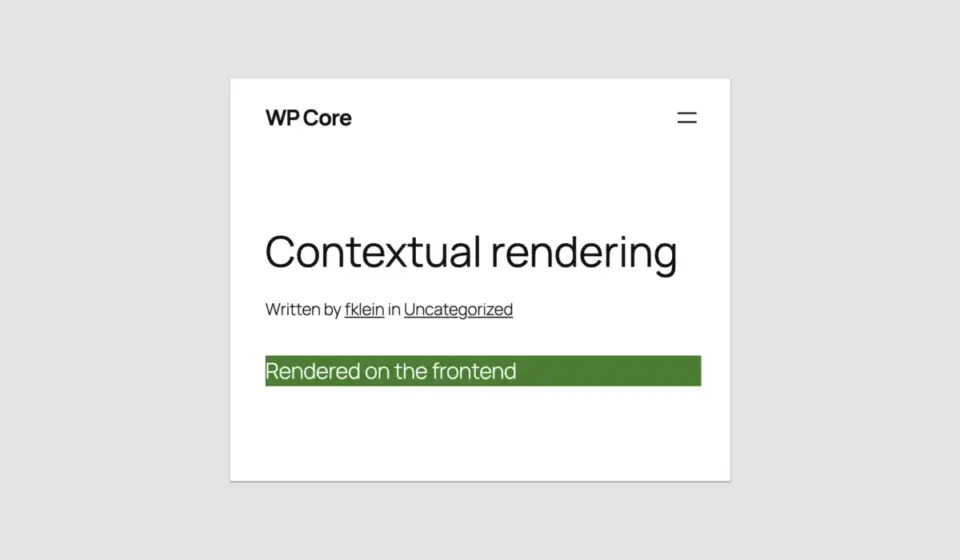
When you need different behaviors or styling inside the administrator dashboard versus the public-facing site, use wp_is_rest_endpoint() to check context safely:

function css_tricks_php_only_detecting_editor_render()
  register_block_type(
    'css-tricks/php-only-detecting-editor-render',
    [
      'title' => 'PHP-Only Contextual Block',
      'render_callback' => function ()
        $is_editor = wp_is_rest_endpoint() && str_contains($GLOBALS['wp']->query_vars['rest_route'] ?? '', 'v2/block-renderer/');
        $bgcolor = $is_editor ? 'blue' : 'green';

        return sprintf(
          '<div %s>%s</div>',
          get_block_wrapper_attributes(['style' => "color: #fff; background-color: $bgcolor;"]),
          $is_editor ? 'Rendered in the editor' : 'Rendered on the frontend'
        );
      ,
      'supports' => ['autoRegister' => true]
    ]
  );

add_action('init', 'css_tricks_php_only_detecting_editor_render');
Leveraging Block Supports and Restricting Inserter Visibility
You can fine-tune how blocks behave in the editor by utilizing the Block Supports API. For example, if a block is meant strictly for template integration and should not be cluttered in the global block inserter, hide it programmatically:
'supports' => [
  'autoRegister' => true,
  'inserter' => false, // Hides block from user inserter while keeping it fully functional in templates
  'multiple' => false, // Limits the block to a single instance per post
  'align'    => ['left', 'center', 'right'], // Restricts alignment options
],
Future Outlook and Ecosystem Impact
The introduction of PHP-only block registration in WordPress 7.0 signals a maturing philosophy within the WordPress Core team: developer pragmatism.
While the future of advanced, dynamic web applications unquestionably relies on JavaScript and decoupled frameworks, the reality of millions of legacy PHP implementations could not be ignored. By lowering the entry barrier for backend developers, WordPress has removed the single greatest obstacle preventing widespread block theme adoption.

For new, highly interactive UI components, JavaScript remains mandatory. But for migrating corporate archives, legacy widgets, and complex template parts, PHP-only blocks are an unqualified triumph. Seven and a half years after the inception of Gutenberg, the platform has finally built a bridge that respects its past while empowering its future.
What do you feel about this post?

Like

Love

Happy

Haha

Sad

Angry