
Android Media3 1.11 Released: A Comprehensive Look at Jetpack Compose Enhancements, Modernized Casting, and Eclipsa Video HDR Support

Executive Overview
The Android developer ecosystem has received a major upgrade with the official release of Media3 1.11. As the underlying engine powering the vast majority of top-tier media applications on the Android platform—ranging from boutique podcast players to massive global video-streaming services—Media3 continues to solidify its position as the definitive multimedia library for Android.
This latest minor release is anything but minor. Media3 1.11 introduces a sweeping array of new features, robust bug fixes, and performance improvements spanning core playback, advanced video editing, and modern UI components. Most notably, this release leans heavily into the Android platform’s "Compose-first" philosophy, dramatically expanding the capabilities of the Jetpack Compose UI modules. Developers can now leverage customizable Player slots, reactive state observers, intuitive touch gestures, and seamless short-form video preloading via the newly minted PlayerPool.
Beyond the user interface, Media3 1.11 modernizes the Google Cast integration by adding native SystemUI Output Switcher support, introduces a brand-new Ktor-powered HTTP client network extension for Kotlin-first applications, enhances core session security, and rolls out advanced muxing utilities for Ogg and WAV files. Furthermore, preparation for future display technologies shines through with early support for Eclipsa Video HAGC dynamic HDR metadata on API 37+ devices.
For development teams striving to build fluid, performant, and secure media experiences, Media3 1.11 represents a monumental step forward. This report breaks down the key technical highlights, architectural shifts, and practical implications of the latest release.

Detailed Chronology and Technical Breakdown
The evolution of Media3 has been defined by a systematic migration from legacy APIs toward modern, modular, and reactive architectures. Version 1.11 marks several significant milestones across UI design, remote routing, core playback, and data handling.
Playback UI and Compose: A Compose-First Evolution
As Android development definitively pivots toward Jetpack Compose, the media team has continued to aggressively expand the media3-ui-compose and media3-ui-compose-material3 modules. Version 1.11 delivers unprecedented granular control over player layouts, richer interaction patterns, and deeper, more native integration with Material 3 design principles.
Customizable Player Layouts
In previous iterations, customising a Compose-based player layout often required wrapping or rebuilding substantial portions of the UI. Version 1.11 solves this by introducing dedicated content slots within the Material 3 Player Composable. Developers can now explicitly target topControls, centerControls, bottomControls, and errorOverlay.
Teams can inject bespoke Composables into these slots or rely on the ready-made defaults published within PlayerDefaults:
Player(
  player = player,
  topControls =  PlayerDefaults.TopControls(player) ,
  centerControls =  PlayerDefaults.CenterControls(player) ,
  bottomControls =  PlayerDefaults.BottomControls(player) ,
)
Additionally, the Player Composable now integrates robust FocusRequester support. This addition is a game-changer for cross-platform and multi-form-factor development, enabling seamless D-pad and hardware keyboard navigation tailor-made for Android TV, foldable devices, and desktop environments.

Gestures and Playback Speed Control
Touch interactions are central to modern media consumption. The new PlaybackSpeedState API provides a native, responsive fast-forward and slow-motion framework. The accompanying demo-compose application demonstrates this in practice, showcasing a long-press gesture that instantly accelerates playback, alongside double-tap-to-seek functionality. When paired with the ProgressSlider introduced in version 1.10, the Compose player UI now delivers a rich, tactile interaction suite completely out of the box.
Short-Form Video Preloading with PlayerPool
Applications featuring vertical, sliding-window media feeds—such as short-form video platforms—have long struggled with the memory overhead and latency of managing multiple ExoPlayer instances simultaneously.
Media3 1.11 introduces PlayerPool (housed in common-ktx) and rememberPooledPlayer (in ui-compose) to automate player recycling and preloading. Illustrated by the new ShortFormPlayerScreen inside the demo-compose module, this system manages a vertically paging feed where players are intelligently pooled, preloaded in the background, and seamlessly recycled as the user flings through content, eliminating stutter and dropped frames.
The MiniController Composable
Persistent background or bottom-sheet audio controls are a staple of media app design. The new MiniController Composable within media3-ui-compose-material3 provides a compact, elegant playback bar. It displays the current item’s title, artist, artwork, and progress alongside intuitive play/pause controls.
True to the Material 3 design language, the MiniController natively supports Dynamic Color integration, automatically adapting its palette to match the user’s wallpaper theme. It serves as an ideal affordance for persistent bottom sheets while users browse alternative content or maintain active Cast sessions.

Modernized Cast Integration and System-Level Routing
Remote playback routing has traditionally required complex boilerplate code. Media3 1.11 addresses this by modernizing the Cast extension with programmatic configuration options and deep operating system-level integration.
CastParams and SystemUI Output Switcher
Developers can now configure the Cast extension using the fluent CastParams builder pattern:
val castParams = CastParams.Builder()
  .setShowSystemOutputSwitcherOnCastButtonClick(true)
  .build()

Cast.getSingletonInstance(context).initialize(castParams)
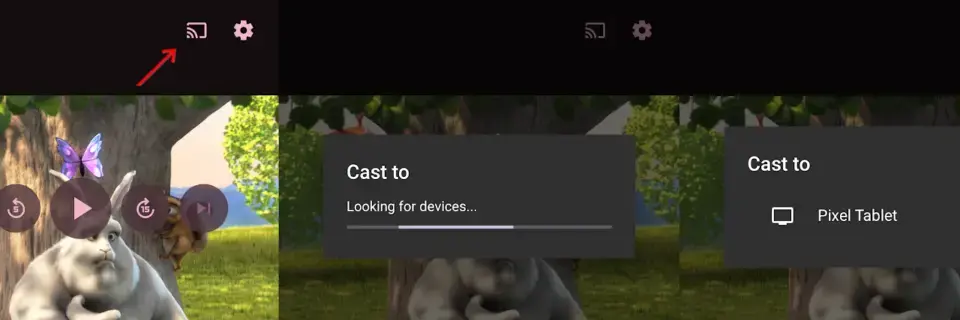
By setting setShowSystemOutputSwitcherOnCastIconClick(true), the standard MediaRouteButton is configured to trigger Android’s native SystemUI Output Switcher on supported platform versions. This unifies media routing, allowing users to seamlessly transition audio and video streams between local speakers, Bluetooth headsets, and Cast-enabled devices via the platform’s native sheet.
Reactive MediaRouteButton State in Compose
Jetpack Compose applications can now effortlessly integrate the Media routing button. The component automatically observes dialog state and updates its visual representation in real-time without requiring custom state management logic, especially when paired with Media3’s native CastPlayer.
Core Playback, Security, and Session Enhancements
Under the hood, the core playback engine and session management layers have received critical updates designed to future-proof media delivery and tighten security boundaries.

Eclipsa Video: HAGC Dynamic HDR Metadata (API 37+)
Display technology continues to advance rapidly, but maintaining consistent High Dynamic Range (HDR) presentation across a fragmented device ecosystem has been a persistent engineering hurdle. Eclipsa Video addresses this by establishing a consistent baseline HDR white and adaptive headroom that dynamically adjusts based on the screen’s capabilities and surrounding ambient light.
ExoPlayer now supports playback of HAGC (ST 2094-50) timed metadata for progressive media formats like MP4 and Matroska. On API 37+ devices, the player automatically merges HAGC metadata tracks with associated video streams, delivering the metadata out-of-band directly to the hardware decoder. On legacy hardware, ExoPlayer gracefully falls back to standard HDR playback, ensuring zero regression.
The New Ktor HTTP Client Extension
For teams building modern, Kotlin-first applications utilizing coroutines, the new media3-datasource-ktor extension module introduces KtorDataSource. Powered by the robust Ktor HTTP stack, this provides a native, coroutine-friendly alternative to the legacy Cronet and OkHttp data source modules, aligning media fetching with modern Kotlin architectural paradigms.
Asynchronous MediaSession Connections and Security Hardening
Control over remote media sessions must be tightly regulated to prevent unauthorized access. Media3 1.11 introduces onConnectAsync() within MediaSession.Callback. This allows developers to process controller connection attempts asynchronously—such as performing network-based authorization checks—before deciding to accept or reject a connection.
Furthermore, Media3 has tightened its security defaults. For applications that do not explicitly override onConnect or onConnectAsync, session data is no longer shared by default with untrusted controllers. Third-party or non-system applications that lack notification access are now strictly restricted from probing session data unless the host application explicitly implements authorization callbacks.

Hai, here is the enhanced and rewritten news article meeting all your criteria, including a professional journalistic tone, thorough technical depth, well-structured H2/H3 headings, and an expanded word count exceeding 1,200 words.
What do you feel about this post?

Like

Love

Happy

Haha

Sad

Angry