
Jetpack Compose 1.12 Arrives: A Landmark Release Delivering Native Mesh Gradients, HDR Power, and View-Parity Startup Speeds

Executive Overview
The Android development ecosystem has reached a monumental milestone today with the official, stable rollout of Jetpack Compose August ’26 (Version 1.12). Representing a major evolutionary leap for Google’s modern, declarative UI toolkit, this release spans core Compose modules via version 1.12 and can be seamlessly integrated into existing projects by updating the Compose Bill of Materials (BOM) to version 2026.08.00.
Jetpack Compose 1.12 is far more than a routine maintenance update; it is a foundational overhaul addressing performance ceilings, graphic fidelity, structural layout flexibility, and platform integrations. Highlights of this release include rich visual APIs such as Mesh Gradients and full-pipeline Wide Color Gamut (WCG) and HDR rendering, alongside sophisticated structural enhancements like named areas within experimental Grid layouts. Furthermore, native integration with Android’s Credential Manager, advanced text formatting and programmatic text selection tools, and dramatic performance boosts that bring startup times down to traditional View framework parity position this release as an essential upgrade for enterprise-grade mobile applications.
To adopt these powerful new features, developers must update their project dependencies to the new BOM standard:
implementation(platform("androidx.compose:compose-bom:2026.08.00"))Despite the wealth of new capabilities, developers must also account for breaking changes, notably the requirement to upgrade the compileSdk to API 37, necessitating Android Gradle Plugin (AGP) 9.1.1 or higher.
Detailed Chronology & Core Architectural Updates
The journey toward Compose 1.12 has been shaped by continuous feedback from the global Android developer community, early previews at Google I/O, and rigorous internal benchmarking. The release introduces critical architectural shifts, breaking changes, graphics innovations, runtime optimizations, and advanced animation primitives.
Breaking Changes & Migration Paths
Transitioning to Jetpack Compose 1.12 requires careful attention to a few foundational updates:

- AGP & Compile SDK: Compose 1.12 updates the target
compileSdkto API 37. To compile successfully, projects must update to a minimum of AGP 9.1.1. Google reiterates that Compose will continue to aggressively target the latest compile SDK to ensure developers have immediate access to platform innovations. - Deprecation of
Modifier.onFirstVisible(): This modifier has been officially deprecated. Developers are urged to migrate toModifier.onVisibilityChanged(), which offers granular visibility threshold tracking for complex scrolling and layout scenarios.
Graphics, Shaders, and Color Fidelity
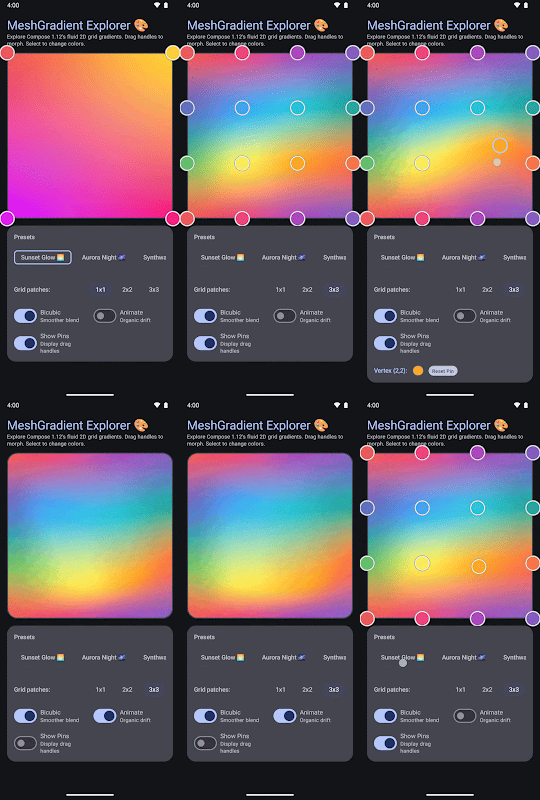
For years, Android developers looking to create sophisticated, multi-point organic gradients relied on custom canvas drawing or third-party bitmap rendering. Compose 1.12 changes this landscape entirely.
1. Mesh Gradients (MeshGradientPainter)
The introduction of MeshGradientPainter allows developers to build complex, multi-point, organic color gradients declaratively. By defining custom vertices, rows, and columns, UI designers can achieve smooth, mesh-based color distributions that scale gracefully across arbitrary aspect ratios:
val rows = 1
val columns = 1

val gradientPainter = remember
    MeshGradientPainter(rows, columns)
        // Parameters: row, column, position, color
        setVertex(0, 0, Offset(0f, 0f), Color.Red)     // Top-Left
        setVertex(0, 1, Offset(1f, 0f), Color.Blue)    // Top-Right
        setVertex(1, 0, Offset(0f, 1f), Color.Green)   // Bottom-Left
        setVertex(1, 1, Offset(1f, 1f), Color.Yellow)  // Bottom-Right


Box(
    modifier = modifier
        .aspectRatio(16/9f)
        .fillMaxWidth()
        .paint(gradientPainter)
)
2. Wide Color Gamut (P3) and HDR Support
Modern mobile hardware boasts displays capable of delivering extended color fidelity and exceptionally high dynamic range. Compose 1.12 introduces full-pipeline support for Wide Color Gamut (Display P3) and HDR rendering across all graphics primitives, paint routines, and shaders.
Colors defined in non-sRGB color spaces (such as Display P3) are preserved all the way through to platform rendering without destructive color clamping. For edge cases—such as running on older Android versions (API 28 and below) or utilizing unsupported color spaces like CieXyz, CieLab, or Oklab—the framework intelligently falls back to standard sRGB, ensuring crash-free, backwards-compatible visual presentation.
Runtime Optimizations: Keyed SideEffect Overload
Performance optimization in Compose runtime continues to be a core pillar. Version 1.12 introduces a key-based overload for SideEffect, enabling developers to fire one-shot side effects precisely when specific keys change.
By eliminating the overhead of coroutine management or dispose blocks when they are not strictly necessary, the new keyed SideEffect is up to 90% faster than LaunchedEffect and approximately 20% faster than DisposableEffect.

@Composable
fun AnalyticsTracker(userId: String, screenName: String)
    SideEffect(key1 = userId, key2 = screenName)
        analytics.logScreenView(userId, screenName)
Developer Note: Because SideEffect executes its block prior to DisposableEffect and LaunchedEffect, caution must be exercised when migrating existing effects—particularly LaunchedEffects that rely on dispatching only after the current UI frame has fully rendered.
Animation & Interactive Two-Stage Transitions
Building fluid, gesture-driven user interfaces gets a massive upgrade as DeferredTargetAnimation moves out of its experimental phase. Compose 1.12 introduces two landmark composables: DeferredAnimatedContent and DeferredAnimatedVisibility.
These APIs enable developers to construct interactive two-stage transitions, which are critical for smooth predictive back gesture tracking and complex swipe-to-dismiss interfaces.
- Manual Animation Control: During the deferred phase of a transition, properties like scale and offset can be manually manipulated in real-time in response to raw touch input.
- Seamless Handoff: Once the user gesture concludes, the transition engine takes over seamlessly, executing velocity transfer into the automatic transition engine.
- Shared Element Integration: The inclusion of the
permitTransformDuringDeferredTransitionflag insideSharedContentConfigallows shared elements to transform visually in sync with their parent containers during the deferred phase.
val state = remember  DeferredTransitionState(initialScreen)
val transition = rememberDeferredTransition(state)

if (predictiveBackInProgress)
    state.defer(targetScreen)
 else
    state.animateTo(targetScreen)


transition.DeferredAnimatedContent(
    targetState = targetScreen,
    mutableTransformSpec =
       MutableContentTransform
           // Manually manipulate properties during the deferred phase
           initialContentTransform  scale = swipeProgress


)  screen ->
    ScreenContent(screen)
Supporting Context & Metrics: Text, Layout, and Platform Integrations
Beyond graphics and animation, Compose 1.12 refines how applications handle text input, structured layouts, user authentication, and automated testing.
Editable Text Formatting & Selection Controls
Text manipulation receives powerful enhancements across BasicTextField and TextFieldState:
- Rich-Text Buffering: Programmatic inline character and paragraph formatting can now be applied via
SpanStyleandParagraphStyleinside theaddStyle()method within aTextFieldBufferscope (such as duringtextFieldState.edit ...). Styles persist cleanly across configuration changes. - Granular Selection State: The new
SelectionStateAPI offers complete programmatic control and observability over text selections inside aSelectionContainer. Developers can inspect reactive lists of selected text (AnnotatedStrings), programmatically invokeselectAll()orclear(), and extend selections by word boundaries.
Native Credential Manager Integration
Authentication flows are streamlined via direct integration with Android’s Credential Manager (API 34+), with pre-API 34 support handled gracefully via the Jetpack credentials library. By attaching the new credentialRequest semantics property (CredentialRequestData) to text fields, apps can trigger passkeys, saved credentials, and sign-in sheets directly inline during user input.

@Composable
fun LoginField(textFieldState: TextFieldState)
    val credentialData = remember
        CredentialRequestData(
            // Specify Credential Manager request options
        )


    BasicTextField(
        state = textFieldState,
        modifier = Modifier.semantics
            credentialRequest = credentialData

    )
Layout Enhancements: Named Areas in Grid Layouts
Complex 2D layouts have historically required tracking cumbersome row and column index numbers. Compose 1.12 introduces named structural regions in the experimental Grid component (GridConfigurationScope), allowing developers to position items intuitively by semantic area names:
@OptIn(ExperimentalGridApi::class)
@Composable
fun DashboardLayout()
    Grid(
        config =
            area("header", row = 0, column = 0, rowSpan = 1, columnSpan = 2)
            area("sidebar", row = 1, column = 0)
            area("content", row = 1, column = 1)
            gap(16.dp)

    )
        HeaderSection(modifier = Modifier.gridItem(areaId = "header"))
        NavigationSidebar(modifier = Modifier.gridItem(areaId = "sidebar"))
        MainContentView(modifier = Modifier.gridItem(areaId = "content"))
Performance Benchmarks: Achieving View Parity
Performance optimization remains an unrelenting focus for the Android UI toolkit team. In Compose 1.12, profound architectural improvements targeting startup execution have paid off. According to Google’s latest internal Hero Benchmarks, the Time to Initial Display (TTID)—the duration required for an application to produce its very first interactive frame—is now directly comparable to traditional Android Views.
[ Traditional Views TTID ]  ████████████████████  (Fast)
[ Compose 1.12 TTID      ]  ████████████████████  (Equivalent Parity)
[ Older Compose Versions ]  ██████████████████████████  (Slower)
Testing & Tooling Upgrades
To combat test flakiness and reduce execution times during state sampling, Compose 1.12 introduces advanced test synchronization APIs. By disabling implicit waits and manually pacing frames via mainClock, test suites can query multiple nodes within a single frame without incurring redundant synchronization penalties:
@Test
fun testAnimationStateFast()
    composeTestRule.mainClock.autoAdvance = false

    while (composeTestRule.hasPendingWork())
        composeTestRule.mainClock.advanceTimeByFrame()
        composeTestRule.waitForIdle()

        composeTestRule.runOnUiThread
            composeTestRule.runWithoutImplicitWait
                val box1 = composeTestRule.onNodeWithTag("Box1").fetchSemanticsNode()
                val box2 = composeTestRule.onNodeWithTag("Box2").fetchSemanticsNode()

                assertThat(box1.boundsInRoot.right).isAtMost(box2.boundsInRoot.left)
Official Statements & Community Reactions
The release of Jetpack Compose 1.12 has garnered immense praise from across the mobile development community, validating years of engineering investment by Google into reactive UI paradigms.
"With Jetpack Compose 1.12, we set out to answer the most demanding performance and graphical requirements from our enterprise partners," noted a lead engineer on the Android UI framework team. "Achieving View-level startup parity on Time to Initial Display while simultaneously introducing advanced GPU-accelerated primitives like Mesh Gradients and Wide Color Gamut pipelines proves that developers no longer have to compromise between modern declarative productivity and raw, uncompromising performance."
Early adopters and library maintainers have similarly highlighted the importance of the new animation handoffs and credential management hooks. By bridging the gap between gesture-driven navigation and automated transitions, Google has dramatically lowered the barrier of entry for building polished, high-end consumer application experiences that adhere strictly to modern Material Design guidelines.

Future Outlook
As Jetpack Compose matures into its role as the undisputed standard for Android UI development, version 1.12 sets a high watermark for what developers can expect from the platform. The ongoing evolution of experimental features—such as the Styles API, which continues to undergo strict architectural refinement to guarantee type safety for custom design systems—points toward a future of even greater unification and design consistency.
Furthermore, the foundational performance gains realized in this release pave the way for upcoming optimizations in large-scale recomposition pruning, advanced baseline profile generation, and cross-platform multiplatform (KMP) layout consistency. Developers are encouraged to migrate their projects to BOM 2026.08.00 today, test their navigation and animation stacks against the new deferred transition APIs, and submit any feedback or edge cases directly to the Android Issue Tracker.
Happy composing!
What do you feel about this post?

Like

Love

Happy

Haha

Sad

Angry