

Executive Overview
You closed a modal dialog, and your browser console flashed a sharp, angry shade of yellow. Highlighting the error message, you dropped it into a search box, only to find yourself funneled onto a digital highway shared with half the front-end internet. Whether your stack runs on Angular, Bootstrap, Ionic, or phpMyAdmin, this exact string pops up identically.
Here is the inconvenient truth that top-ranking search results consistently bury: the warning is entirely correct.
There is a real human being on the other side of that warning—someone navigating the web with a screen reader whose focus is about to plunge directly into a hidden abyss on your webpage.
The most common fixes currently ranking on search engines all rely on identical workarounds under different names: the blur() one-liner, the setTimeout wrapper, or the hack where developers yank the aria-hidden attribute off the DOM entirely. Each of these solutions quiets the console while quietly harming the user the browser was trying to protect. If you have already shipped one of these band-aids into production, take solace in knowing you are in massive company. You were failed by your search engine results, not your own negligence. I know this because I shipped one, too.
Detailed Chronology: The Evolution of the Focus Paradox
To understand how the developer community reached an impasse where silencing the console often means breaking accessibility, we must examine how modern browser engines handle the paradox of accessibility trees versus keyboard focus navigation.
The Rise of the Console Warnings
Chromium has been quietly patching accessibility edge cases around focusable aria-hidden nodes for years, but the warnings we see today arrived in distinct waves.
- The Open-Time Variant: Emerging around Chrome 127 in the summer of 2024, this warning scolds developers about an element that "just received focus" while residing inside a hidden container. Issues flooded open-source trackers across MUI, Ant Design, and Flowbite.
- The Close-Time Variant: Arriving months later with Chrome 131 in late 2024, the "retained focus" warning caught developers off guard during the beta and nightly cycles, immediately triggering bug reports across Bootstrap and Angular repositories.
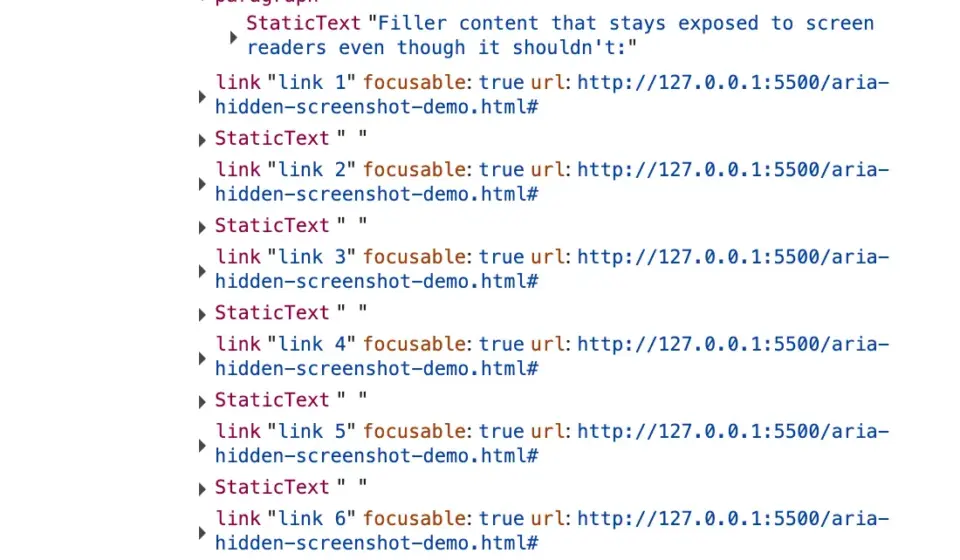
Underneath these two error messages lies a fundamental architectural flaw: aria-hidden pulls content out of the accessibility tree, but it does not pull that content out of the keyboard focus order.
These two distinct systems are left entirely un-synchronized by the browser spec. Consequently, an element can be fully focusable by a keyboard while simultaneously being completely imperceptible to a screen reader. The instant the Tab key lands on it, developers create what can only be described as ghost focus: the screen reader fires an event for a node it was explicitly told does not exist, looks it up, finds nothing it is allowed to describe, and falls completely silent.
Why Firefox and Safari Stay Quiet
While Chrome shouts loudly via the console, Firefox and Safari handle the same scenarios silently. Whatever those browser engines do with focused content inside hidden subtrees, they execute without dropping a trace in your logs.
However, silencing the developer is not the same as solving the bug. A silent fix allows broken code to ship indefinitely because a browser papering over your mistake is indistinguishable from your code actually being correct. Chrome’s loud approach is uncomfortable, but it is honest.
Supporting Context & Metrics: The Four Traps We Fall Into
When developers encounter the console warning, they typically fall into one of four architectural traps. Misidentifying the root cause leads directly to applying the wrong fix.

[ Console Warning Triggered ]
       │
       ├─► 1. Closes a modal (Fade-out active) ──► The Close-Time Race
       ├─► 2. Opens a modal (Trigger trapped)  ──► The Open-Time Inversion
       ├─► 3. Nested components (Select/Popover)──► The Composition Turf War
       └─► 4. User changes tabs / Alt-Tabs      ──► The Page-Exit Disconnect
1. The Close-Time Race (Hidden Mid-Goodbye)
You click the close button, and the dialog initiates its CSS fade-out. For those 200 milliseconds of transition, focus remains parked on the close button. Because that button sits inside the overlay that the component library just marked as hidden, you have a hidden modal with a focused button inside it, and nowhere for focus to go because the restoration code hasn’t executed yet.
2. The Open-Time Inversion (The Trigger Left Behind)
Running the sequence in reverse: the overlay opens, and the library marks the background aria-hidden="true". However, the button the user just clicked lives in that background, holding focus for a brief moment before anything moves it into the dialog. You now have a hidden region with a focused node inside, triggering the open-time error message.
3. The Composition Turf War (Nested Components)
You open a <dialog>, and inside it, you place a <select> element. When the user interacts with the select dropdown, two separate component libraries—each believing they are the "one true modal layer"—fight over who gets to hide the rest of the page. Under React 19, this structural battle graduates from an annoyance to a fatal error: the inner select tears down, focus drops to body for a single frame, the parent dialog reads this as a click outside its bounds, and keyboard navigation freezes permanently.
4. The Page-Exit Disconnect
Nothing on your page changed, but the user hit Alt+Tab or switched browser tabs entirely. Focus bookkeeping strands an aria-hidden state on teardown with no live focus to reconcile against.
Official Statements & Industry Counter-Measures
Why the Internet’s Favorite Fixes Fail
When panicking developers search for a solution, they inevitably encounter the web’s most popular one-liner: calling .blur() inside the modal’s hide handler.
// The internet's favorite one-liner (DO NOT USE)
element.addEventListener('hide.bs.modal', () =>
    document.activeElement.blur();
);
While this instantly clears the console warning, it comes at a devastating cost to accessibility. Calling blur() without immediately shifting focus elsewhere strands the user’s focus on the <body> element. For a mouse user, this is invisible. For a screen reader user, the assistive technology goes completely silent, and the very next Tab press restarts navigation from the absolute top of the entire document—a direct violation of WCAG 2.4.3 (Focus Order).
The Correct Teardown Contract
To satisfy both the browser’s architecture and the human user’s needs, developers must adhere to a strict, four-step imperative teardown contract:
- Un-inert the background first:
inertblocks focus entirely. If your trigger lives inside the background container, you must remove theinertattribute before attempting to focus it. - Move focus out synchronously: Shift focus back to the trigger button before any hiding state or CSS classes are applied.
- Inert the closing shell: Apply the
inertattribute (notaria-hidden) to the dying modal overlay so it remains completely unreachable to keyboard and screen reader users while it fades out. - Unmount on transition end: Clean up event listeners and remove the element from the DOM only after the CSS transition successfully completes.
// The Correct Teardown Implementation
function closeModal(dialog, triggerButton, background)
    // Step 1: Hand the page back first
    background.removeAttribute('inert');

    // Step 2: Move focus OUT before anything gets hidden
    triggerButton.focus();

    // Step 3: Mark the closing shell as inert during its fade
    dialog.setAttribute('inert', '');
    dialog.style.pointerEvents = 'none';
    dialog.classList.add('is-closing');

    // Step 4: Safely unmount after transition
    const handleTransitionEnd = (e) =>
        if (e.target !== dialog) return;
        dialog.removeEventListener('transitionend', handleTransitionEnd);
        dialog.hidden = true;
        dialog.classList.remove('is-closing');
        dialog.removeAttribute('inert');
        dialog.style.pointerEvents = '';
    ;

    dialog.addEventListener('transitionend', handleTransitionEnd);
Future Outlook: Moving Toward Native Primitives
As the web engineering community matures past the friction of retrofitted ARIA hacks, the ecosystem is rapidly standardizing around native browser primitives.
The ultimate long-term solution to this entire class of bugs is the native HTML <dialog> element combined with the .showModal() method. By leveraging the browser’s native top layer and implicit inertness, the browser handles the complex choreography of focus management and document hiding natively.
Libraries like Bootstrap have already begun abandoning complex manual accessibility wrappers in version 6 in favor of native dialog mechanics. Meanwhile, working groups within the W3C continue refining specifications to eliminate the architectural gaps between focus rings and accessibility trees.
Until native <dialog> adoption is universal across every enterprise design system, developers must look past quick-fix console silencers. The console warning is not an arbitrary annoyance; it is an automated proxy speaking on behalf of users who rely on assistive technologies. Clean logs were never the goal—building a resilient, accessible web for everyone is.
What do you feel about this post?

Like

Love

Happy

Haha

Sad

Angry