
Revolutionizing Android Development: Building Privacy-First, Intelligent Apps with Gemini Nano and ML Kit

Executive Overview
The landscape of mobile application development is undergoing a paradigm shift. For over a decade, artificial intelligence in consumer software has relied heavily on cloud-backed infrastructure, requiring constant network connectivity, incurring unpredictable hosting costs, and introducing latency and data-privacy vulnerabilities. Today, that architecture is rapidly decentralizing.
In the second installment of the Android Developers blog series, "Build Intelligent Android Apps," Google has laid out a blueprint for the next generation of mobile experiences. By leveraging Gemini Nano—Google’s most efficient on-device large language model (LLM)—and the newly updated ML Kit Generative AI APIs, developers can transform standard mobile applications into hyper-personalized, intelligent, and context-aware ecosystems.
This transformation is demonstrated through Jetpacker, a feature-rich demo application designed to guide developers through the practical implementation of on-device AI. Rather than relying on theoretical concepts, the series explores three concrete, user-facing features integrated directly into Jetpacker:
- Intelligent Itinerary Summarization: Distilling dense travel schedules into actionable vibes, preparation tips, and localized phrases.
- Automated Expense Management: Parsing sensitive receipts locally via multimodal OCR and structured output parsing.
- Voice Note Processing: Transcribing and categorizing audio logs directly on-device using advanced speech recognition linked to generative prompts.
By running these processes locally, developers bypass the traditional privacy trade-offs of AI integration. Sensitive personal information—ranging from financial statements and credit card numbers to private audio memos—never leaves the user’s physical hardware. This comprehensive overview examines the technical architecture, practical code implementations, performance optimizations, and strategic implications of embedding Gemini Nano directly into the Android OS.

Detailed Chronology: The Evolution of On-Device AI in Jetpacker
The journey toward creating truly agentic and intelligent Android applications requires a methodical, step-by-step integration of machine learning pipelines. The Jetpacker series breaks this down into an evolutionary timeline, focusing heavily on the capabilities introduced by Gemini Nano 4, which builds upon the structural foundations of the Gemma 4 open-architecture models.
Step 1: Laying the Groundwork with Itinerary Summarization
Travel itineraries are notoriously dense blocks of data, filled with timestamps, flight numbers, reservations, and location coordinates. Presenting this raw data to a user often induces cognitive overload rather than excitement.
To solve this, the Jetpacker team introduced a "Get ready for your trip" module at the top of the itinerary dashboard. When a user opens their trip plan, the app feeds the itinerary text into an instance of Gemini Nano running locally on the device. The model processes the text to generate:
- An overarching summary of the trip’s "vibe" (e.g., a classic Parisian adventure blending art, history, and gastronomy).
- Tailored preparation tips.
- Essential local phrases to learn before departure.
// implementation("com.google.mlkit:genai-prompt:1.0.0-beta3")

// Define the configuration for Gemini Nano 4 E2B preview model
val previewFastConfig = generationConfig
    modelConfig = modelConfig
        releaseStage = ModelReleaseStage.PREVIEW
        preference = ModelPreference.FAST


val geminiNano2BPreviewModel = Generation.getClient(previewFastConfig)
val tripItinerary = ...

val getReadyForYourTripSummary = geminiNano2BPreviewModel
 .generateContent("Given this trip itinerary: $tripItinerary, " +
     "generate the following: overall vibe, tips on how to prepare for this " +
     "trip, and common short phrases to learn for the trip.")
Overcoming Token and Latency Bottlenecks
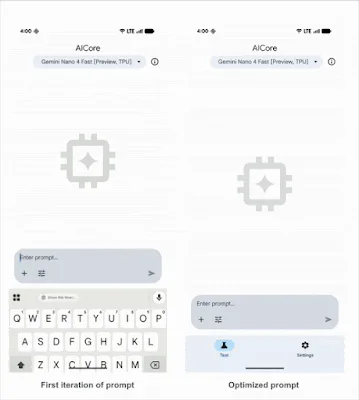
During early testing via the AICore developer preview, developers encountered a critical engineering hurdle: the initial prompt iterations generated excessively large token outputs, causing response times to lag up to 13 seconds.

By iteratively refining the prompt structure and restricting unnecessary conversational filler in the output generation schema, the development team reduced response latency to under 2 seconds. This optimization proves that on-device models, when properly constrained, can deliver real-time responsiveness matching or exceeding cloud-hosted alternatives.
Step 2: Multimodal Local Processing for Sensitive Financial Data
Expense tracking is an indispensable feature for travel applications, but it introduces a severe privacy vector. Receipts routinely capture sensitive Personally Identifiable Information (PII), including home addresses, partial credit card numbers, itemized purchase histories, and real-time geolocation tracking.
Routing such data through external cloud servers violates modern data minimization principles and complicates compliance with regulatory frameworks like GDPR and CCPA. Jetpacker solves this by routing receipt images through Gemini Nano 4’s enhanced multimodal processing capabilities, executing both Optical Character Recognition (OCR) and visual data extraction entirely on the device.
To ensure programmatic safety and eliminate parsing errors, the team utilized ML Kit’s Structured Output API, forcing the LLM to map unstructured visual data directly into a strongly typed Kotlin data class via KSP (Kotlin Symbol Processing).

// implementation("com.google.mlkit:genai-prompt:1.0.0-beta3")
// ksp("com.google.mlkit:genai-schema-compiler:1.0.0-alpha1")

@Generable("Information extracted from an expense receipt")
data class ParsedReceipt(
  @Guide("Generated title for the expense less than 6 words. Based on restaurant or activity name.")
  val  String,
  @Guide("Total amount of the expense. Look for values at the bottom and words like total or balance due.")
  val amount: Double,
  @Guide("Type of expense", enumValues = ["travel", "food", "shopping", "entertainment", "other"])
  val category: String,
)

val prompt = "Determine if the image is a receipt or expense. " +
    "If it is NOT a receipt or expense, output the text 'NOT_A_RECEIPT'." +
    "Otherwise, parse the receipt information."

val request = generateContentRequest(ImagePart(bitmap), TextPart(prompt))
val requestWithStructuredOutput = generateTypedContentRequest(request, ParsedReceipt::class)

// Prioritize reasoning power over speed using ModelPreference.FULL
val previewFullConfig = generationConfig
    modelConfig = modelConfig
        releaseStage = ModelReleaseStage.PREVIEW
        preference = ModelPreference.FULL


val geminiNano4BPreviewModel = Generation.getClient(previewFullConfig)
val response = geminiNano4BPreviewModel.generateContent(requestWithStructuredOutput)
val parsedReceipt: ParsedReceipt? = response.candidates.firstOrNull()?.response
Step 3: Audio Transcription and Contextual Tagging
The final core feature added to Jetpacker addresses how users record spontaneous reflections during a journey. Travel journaling is frequently done on the go, making audio memos far more practical than manual typing.
Using the ML Kit GenAI Speech Recognition API, Jetpacker allows users to dictate voice notes. The API operates in two modes:
- Basic Mode: Utilizes traditional on-device speech recognition, compatible with the vast majority of Android devices running API level 31 and higher.
- Advanced Mode: Leverages Gemini Nano to provide superior language coverage, accent adaptability, and transcription fidelity (currently optimized for Pixel 10 hardware).
Once transcribed, the raw text is passed directly into the Prompt API alongside the current trip’s itinerary events. The model strips out verbal filler and automatically links the voice note to the correct itinerary activity, ensuring seamless chronological organization.
// implementation("com.google.mlkit:genai-prompt:1.0.0-beta3")
// implementation("com.google.mlkit:genai-speech-recognition:1.0.0-alpha1")

val tripEvents = ...

val speechRecognizerOptions = speechRecognizerOptions
    locale = Locale.US
    preferredMode = SpeechRecognizerOptions.Mode.MODE_ADVANCED

val speechRecognizer: SpeechRecognizer = SpeechRecognition.getClient(speechRecognizerOptions)

suspend fun transcribeVoiceNote(recognizer: SpeechRecognizer)
    var partialTextResponse = ""
    var transcription = ""

    val request: SpeechRecognizerRequest = speechRecognizerRequest
        audioSource = AudioSource.fromMic()


    recognizer.startRecognition(request).collect  response ->
        when (response)
            is SpeechRecognizerResponse.PartialTextResponse ->
                partialTextResponse = response.text

            is SpeechRecognizerResponse.FinalTextResponse ->
                transcription = response.text
                processAndCategorizeVoiceNote(transcription, tripEvents)


fun processAndCategorizeVoiceNote(transcribedVoiceNote: String, events: List<Event>)
    val prompt = "Given the voice note $transcribedVoiceNote and the following events " +
     "for this trip: $events, rewrite this transcription to remove filler words. " +
     "Then, identify which events from the list this rewritten transcription matches to."

     Generation.getClient().generateContent(prompt)
Supporting Context & Metrics: Why On-Device AI Wins
Transitioning computational workloads from cloud server farms to localized mobile silicon yields quantifiable engineering and financial benefits. Analyzing the architectural footprint of Gemini Nano reveals several core advantages:

- Zero Cloud Infrastructure Costs: Because inference executes entirely on the user’s device (utilizing the device’s NPU—Neural Processing Unit), developers eliminate API call fees, server maintenance overhead, and backend scaling bottlenecks. As user bases scale into millions, operational expenditures remain flat.
- Absolute Data Privacy and Compliance: Financial records, health tracking data, private journals, and personal itineraries never transit public networks or third-party storage nodes. This completely neutralizes entire classes of data-breach vectors and simplifies adherence to strict regulatory mandates such as HIPAA, GDPR, and CCPA.
- Guaranteed Offline Availability: Cloud-dependent AI applications fail the moment a user enters a dead zone, boards a plane, or travels internationally. On-device models like Gemini Nano guarantee uninterrupted, intelligent functionality regardless of connectivity status.
- Hardware-Optimized Efficiency: Running on over 140 million devices globally, Gemini Nano has evolved through successive iterations. Gemini Nano 4, derived from the Gemma 4 architecture, is explicitly tuned for maximum thermal, memory, and battery efficiency on modern mobile processors.
Official Statements and Developer Ecosystem Integration
Google’s engineering teams emphasize that the release of ML Kit’s GenAI APIs and the AICore developer preview represents a turning point for Android application architecture.
"By integrating Gemini Nano through ML Kit’s Prompt API, developers are no longer forced to choose between sophisticated AI capabilities and user privacy," notes the Android Developer Relations team. "We have bridged the gap between heavy cloud reasoning and nimble edge computing, allowing apps to run localized intelligence with minimal battery drain and zero recurring cloud costs."
Furthermore, Google’s structured deployment roadmap provides developers with granular control over hardware profiles. By utilizing ModelPreference.FAST for rapid, low-complexity string manipulation and ModelPreference.FULL for intricate multimodal reasoning and structured schema parsing, engineering teams can precisely balance performance characteristics against available device resources.
Future Outlook: The Roadmap for Intelligent Mobile Architecture
The Jetpacker series is far from complete. While Part 2 establishes the foundation of local on-device inference, Google’s broader roadmap outlines an ambitious trajectory for modern Android development:

- Part 1: Introduction of the Jetpacker demo app and high-level ecosystem overview.
- Part 2 (Current Focus): Deep dive into on-device intelligence using ML Kit GenAI APIs and Gemini Nano for privacy-first itineraries, receipt parsing, and audio memos.
- Part 3: Hybrid and cloud reasoning. Exploring Firebase AI Logic to ground LLM responses in real-world data sources such as Google Maps and live web contexts.
- Part 4: System integration. Connecting applications directly into the core Android intelligence system using AppFunctions.
- Part 5 (Upcoming): In-app agentic workflows. Extending applications with end-to-end booking assistants powered by A2UI (Agentic UI) and the Android Development Kit (ADK).
Conclusion
The era of bolted-on, cloud-dependent artificial intelligence is giving way to native, edge-computed intelligence baked directly into the operating system. Through tools like Gemini Nano 4, ML Kit’s Prompt and Structured Output APIs, and the AICore developer preview, Android developers possess the exact toolsets required to build applications that are faster, vastly more secure, contextually aware, and fundamentally private.
Developers can explore the complete, production-ready source code via the official Jetpacker GitHub Repository and review the accompanying video documentation, "Build Intelligent Android apps with Google’s AI," to begin architecting the next generation of intelligent mobile software.
Copyright 2026 Google LLC. SPDX-License-Identifier: Apache-2.0