


Executive Overview
The latest continuous update cycle for WooCommerce Bookings (Versions 3.6.0 and 3.7.0) marks a significant architectural milestone for merchants who rely on appointment scheduling, event ticketing, and resource rentals. For years, store owners operating high-volume booking models—ranging from multi-location fitness studios and adventure tour operators to consultancy agencies and equipment rental services—faced operational bottlenecks when managing reservations at scale.
The newest iterations of the extension directly target these historic friction points. By introducing native, developer-free CSV import and export tools, a smart calendar interface that dynamically hides unbookable dates, and a dramatic database query optimization overhaul, WooCommerce has eliminated the need for cumbersome custom scripting or heavy third-party plugins. Furthermore, these updates elevate front-end accessibility to meet modern standards, ensuring that users of all technological proficiencies and physical capabilities can navigate reservation flows without barriers.
This comprehensive report breaks down the architectural shifts, performance metrics, user experience enhancements, and actionable migration steps introduced in WooCommerce Bookings 3.6.0 and 3.7.0.
Detailed Chronology & Core Feature Breakdown
The transition from previous iterations to versions 3.6.0 and 3.7.0 was methodical, focusing first on core performance and backend utility before expanding into front-end logic and accessibility refinements.
1. Native CSV Import and Exporting: Breaking Free from Developer Dependencies
Historically, migrating reservation histories into WooCommerce Bookings from external platforms (such as Calendly, Acuity, or custom legacy software) required complex database scripting or specialized developer intervention. Exporting booking archives for accounting, tax reporting, or third-party CRM syncing was similarly restrictive.
With the latest updates, merchants can manage data pipelines directly from the WordPress dashboard:
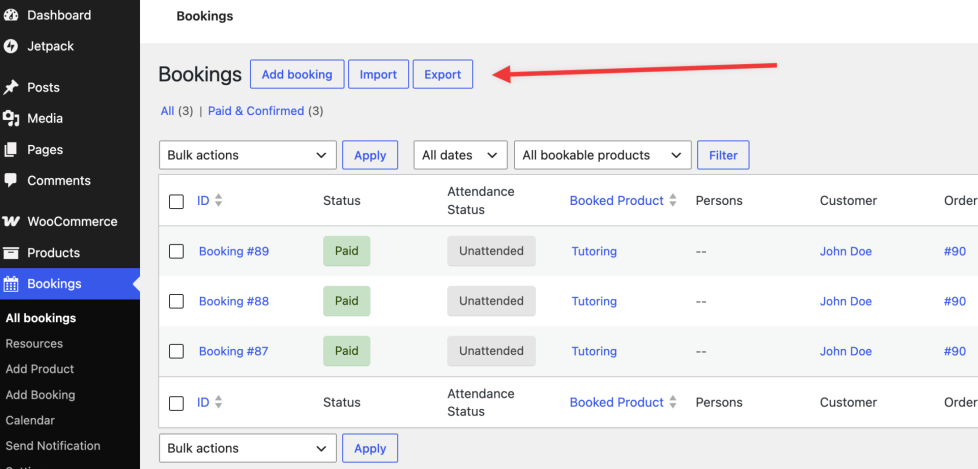
- The Export Workflow: By navigating to Bookings > All Bookings, administrators can extract booking data into a structured CSV file. The interface provides robust filtering parameters, allowing users to isolate data by specific products, booking statuses (e.g., Confirmed, Paid, Cancelled), or custom date ranges. Administrators can also selectively choose which columns to include, tailoring the output for specific business requirements.
- The Import Workflow: Located within the same management screen, the new import utility simplifies data migration. Store managers can upload a CSV file, manually map columns to the appropriate WooCommerce database fields using an intuitive UI, and subsequently review a detailed results log to confirm successful imports or identify formatting errors.
This democratization of data management drastically reduces onboarding times for new merchants migrating to the WooCommerce ecosystem.
2. Intelligent Calendar Filtering: Hiding Unbookable Dates
Customer drop-off during the checkout process often stems from calendar fatigue—users clicking through dates only to find that capacity limits, minimum group sizes, or conflicting schedules render a desired time slot unavailable.
The updated calendar logic fundamentally shifts how availability is communicated:
- Dynamic Date Exclusions: The calendar now actively filters and displays only dates that satisfy a product’s minimum availability requirements.
- Capacity-Driven Logic: For group- and person-based bookings—where events require a minimum threshold of participants or strict capacity limits—the interface prevents users from interacting with dead-end dates. This creates a frictionless booking journey, guiding customers exclusively toward actionable reservation windows.
3. Accessibility Redesigns (A11y)
Digital compliance and inclusive design are no longer optional features; they are essential pillars of modern e-commerce. Versions 3.6.0 and 3.7.0 introduce sweeping accessibility upgrades to the front-end booking form and calendar interfaces:
- Clearer Navigation Labels: Calendar headers, month-switching controls, and day indicators have been rewritten to provide explicit context.
- Screen Reader Enhancements: The date picker now offers superior guidance for assistive technologies. Time slot selections have been optimized so that screen readers can accurately interpret and announce availability states, disabled slots, and chosen times.
Supporting Context & Metrics: The Database Query Revolution
Behind the polished user interface improvements lies a foundational backend engineering overhaul that addresses one of WooCommerce Bookings’ most persistent historical pain points: database performance during high-traffic surges.
The N+1 Query Problem Explained
In previous versions, rendering the customer-facing booking calendar triggered a severe performance bottleneck known as the N+1 query problem. Every time a user loaded a calendar page, WooCommerce executed one separate database query for every single existing booking associated with that product or resource.
For a small boutique offering a handful of daily appointments, this overhead was negligible. However, for enterprise-grade merchants—such as a metropolitan fitness club managing hundreds of daily classes, or a tour company processing thousands of active reservations across dozens of distinct products—loading a single calendar page meant triggering hundreds of individual SQL queries simultaneously.
This architectural debt resulted in:
- Escalating Page Load Times: Customers experienced sluggish interfaces, increasing bounce rates.
- Server Timeouts: During peak booking hours (such as morning registration rushes or promotional flash sales), concurrent users could exhaust server memory allocations, causing temporary site outages or failed checkouts.
The Single-Query Solution
The engineering team resolved this by rewriting the availability-checking mechanism. Instead of querying each booking individually, the updated system checks all booked time slots across the requested period using a single, highly optimized database query.
- Performance Impact: High-volume stores report near-instantaneous calendar rendering speeds.
- Server Stability: CPU and memory loads on database servers drop precipitously during peak traffic windows, mitigating the risk of timeouts and ensuring a resilient checkout experience.
Future Outlook: Implementation, Template Overrides, and Best Practices
While the benefits of upgrading to WooCommerce Bookings 3.6.0 and 3.7.0 are profound, merchants and development agencies must approach the deployment with careful preparation, particularly regarding custom front-end code.

Managing Frontend Template Overrides
Because this release introduces substantial changes to the front-end presentation layer, navigation structures, and accessibility markup, stores utilizing custom Bookings template overrides within their active child themes must proceed with caution.
- The Audit Requirement: Development teams should review customized template files immediately after updating. Failing to synchronize custom templates with the new markup structures can result in broken UI elements, missing accessibility attributes, or script conflicts.
- Testing Protocol: It is strongly recommended to run the update on a staging or development environment before deploying to a live production site. Verify core workflows: create a test booking, execute a CSV export/import cycle, and navigate the calendar using assistive tech or keyboard-only inputs to confirm compatibility.
How to Update
Store administrators can deploy the new versions safely by navigating directly to the WordPress dashboard:
- Go to Plugins > Installed Plugins, locate WooCommerce Bookings, and click Update.
- Alternatively, navigate to WooCommerce > Extensions to trigger the update sequence.
Conclusion
WooCommerce Bookings 3.6.0 and 3.7.0 represent a masterclass in extension lifecycle management. By addressing the triad of administrative friction (native data import/export), user experience friction (smart calendar filtering), and infrastructural friction (database query optimization), WooCommerce has fortified its position as a premier scheduling solution for WordPress. Merchants who embrace these updates will not only save valuable administrative hours but also deliver a faster, more inclusive, and error-free reservation experience to their customers.